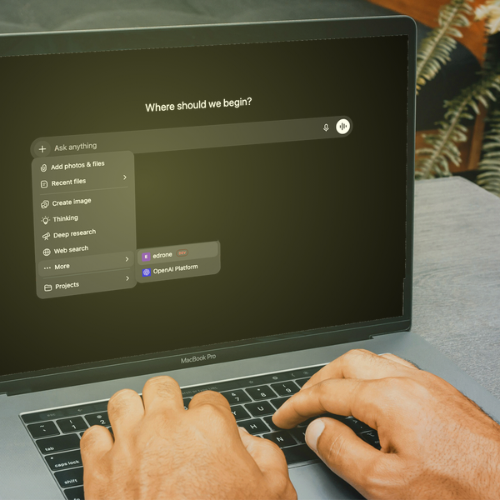
MCP Connector links edrone with Claude, ChatGPT and more. Ask about sales, customers and campaigns in plain language, without digging through separate reports.
MCP Connector links edrone with Claude, ChatGPT and more. Ask about sales, customers and campaigns in plain language, without digging through separate reports.
You know the feeling when the answer to a simple question about your online store’s data takes a login, three filters and an export to a spreadsheet? MCP Connector ends that. You connect edrone to Claude or ChatGPT and ask about sales, customers or campaigns in plain language, and you get the answer from your store’s live data in a few seconds.
Below we take the feature apart: what exactly it is, how it works, what it really gives you and why you can trust it even on a production account.
What is MCP Connector?
MCP Connector is a secure bridge between your store in edrone and an AI assistant such as Claude, ChatGPT or Perplexity. Thanks to it, the assistant reads your store’s data straight from edrone and answers your questions in read-only mode, on current data. As a result, Claude or ChatGPT becomes an AI assistant for your store that knows its numbers inside out.
MCP stands for Model Context Protocol. It is an open standard that lets AI tools connect securely to external data sources. In practice it means one thing: you ask your assistant about your store the way you would ask a teammate who knows every number by heart. No exports. No summaries. No pasting data into a chat.
How does AI read your store’s data from edrone?
Your data lives in edrone. MCP Connector makes it start answering questions asked directly, in the tool you already use for work.
When you ask a question in Claude or ChatGPT, the assistant reaches for the right data straight from your edrone account, analyses it and returns a clear, organised conclusion. You see a finished answer, not a raw table. It is store data analysis by AI, without building a single report. Want to dig deeper? You follow up with one sentence, without going back to reports.
The connector reads your current data: roughly the last 30 days plus running totals. That is why questions about a period are best phrased naturally, for example “last month” or “right now”.
What can you ask your store? Example prompts
Almost anything edrone knows about your store. You ask in your own words, and the answer is built from what is really happening in your store, not from averaged benchmarks off the internet.
A few examples, grouped by topic:
- What is edrone’s share of my revenue and orders?
- Show daily revenue for the last 30 days.
- How does edrone attribution look across different time windows?
- How much revenue did email, SMS, push and WhatsApp bring?
- Automations or newsletters: which earns more?
- Which channel has the best return per message sent?
- Split customers by RFM and show the most valuable segments.
- Which customers are at risk of leaving?
- What are my repurchase rate and customer lifetime value (CLV)?
- What are my bestsellers this month, by revenue and units?
- How is the average order value changing?
- Which products most often end up in abandoned carts?
- How did my last newsletter campaign do: opens, clicks, revenue?
- Which automations generate the most revenue?
- Do I have a deliverability problem anywhere?
- How do my pop-ups and banners convert?
- How is the email and push subscriber list growing?
- How many visitors are identified right now, and how many are anonymous?
This is only the beginning. You will find a ready library of prompts, from a quick account summary to a deliverability analysis, in the edrone Help Center.
What are the benefits of connecting edrone with AI?
In short: you stop searching for data and start using it. Marketing teams often spend more time getting numbers than acting on them. MCP Connector reverses that ratio. It is one of the most practical ways to use AI for e-commerce: not to generate content, but to make faster decisions on your own data.
- Decisions in seconds, not hours. Instead of building a report you ask a question and get the answer straight away. One sentence instead of a whole process.
- Live data instead of stale numbers. You ask and get the state as of now. You do not risk conclusions built on data that went out of date before you pasted it into a spreadsheet.
- Zero manual work. No more CSV exports, clicking through reports and counting in a spreadsheet. Every next question is again just one sentence, not the whole process from scratch.
- Data available to the whole team. Asking a question in natural language needs no advanced analytical skills. Numbers stop being held hostage by the one person who “does reports”.
- Faster reaction to opportunities. From the results of a single product to campaign insights: you see what works at the moment you can still act on it.
Is MCP Connector safe?
Yes. Security and data integrity are the foundation of this feature, which is why MCP Connector was designed to give AI access to data without giving up control over it.
Four safeguards guarantee that:
- Read-only. The AI assistant can ask about data and analyse it, but it will not create, change or delete anything in your account, campaigns or store settings.
- OAuth authorisation. You sign in securely through edrone. There are no API keys to copy and guard.
- Limited to a tracker. The connection sees only the data of the one account you point to.
- GDPR compliance. Customer data is stored on servers in the European Union.
Because access is read-only, you can safely turn this feature on even on a production account. Nothing in your store will move.
Which AI tools does MCP Connector work with?
With your favourite one. MCP Connector is based on the open Model Context Protocol standard, so you connect edrone to the assistant you already use: Claude (Anthropic), ChatGPT (OpenAI) and Perplexity. It also works with any other tool that supports MCP servers, for example Cursor.
You connect once. From then on you simply talk to your store.
More about using artificial intelligence in edrone: What AI tools does edrone have and how do they help run e-commerce?
How do you connect edrone with Claude or ChatGPT?
Setup takes about 2 minutes and needs no developer or API keys. You activate the connector directly in the edrone panel.
- Open the connector page in the panel: Integrations → MCP (or go to control.edrone.me/app/store/integrations/ai-connector).
- Choose your assistant: Claude or ChatGPT. For each one you will find a step-by-step guide with screenshots.
- When asked, paste the MCP server address: https://mcp.edrone.me/mcp
- Sign in through edrone (OAuth) to authorise the connection. It is read-only and limited to your tracker.
- Go back to the AI conversation and ask your first question about your store.
You do not need any API keys. There is nothing to copy, store or configure by hand. You will find the full guide in the article Connect with Claude / ChatGPT.
Your store knows the answers. You just have to ask.
MCP Connector is already available to all edrone customers. Create a free account, connect the connector and talk to your store today in Claude or ChatGPT. No card, no developer, in 2 minutes.
FAQ
MCP Connector is a secure bridge between your store in edrone and an AI assistant such as Claude or ChatGPT. Once connected, the assistant reads your store’s data straight from edrone and answers questions asked in natural language, in read-only mode and on current data.
Yes. Access is based on OAuth authorisation, limited to the tracker you choose and works in read-only mode only, so the AI changes nothing in your account. Customer data is stored in line with GDPR on servers in the European Union.
No. You do not have to manage any API keys. Just pick the assistant in the edrone panel, paste the MCP server address and sign in through edrone (OAuth). The whole setup takes about 2 minutes and needs no developer.
With Claude (Anthropic) and ChatGPT (OpenAI), and with any other app that supports the Model Context Protocol standard, for example Perplexity or Cursor. You set up the connection once and ask from your favourite assistant.
Almost anything edrone knows about your store: revenue and edrone’s share, channel results (email, SMS, push, WhatsApp), customer segments, bestsellers, campaign and automation performance, subscriber list growth, pop-up conversion or deliverability status.

A journalist and communication specialist by training, she has built her career on working with words. She took her first steps in Public Relations, writing dozens of press materials for agencies such as Team Lewis and Grayling. For several years she has been growing her marketing skills, creating all kinds of content, from SMS campaigns and newsletters to long expert articles. At edrone, as a Senior Content Designer, she uses her light pen to share knowledge with online store owners, showing new trends and possible directions for e-commerce. LinkedIn